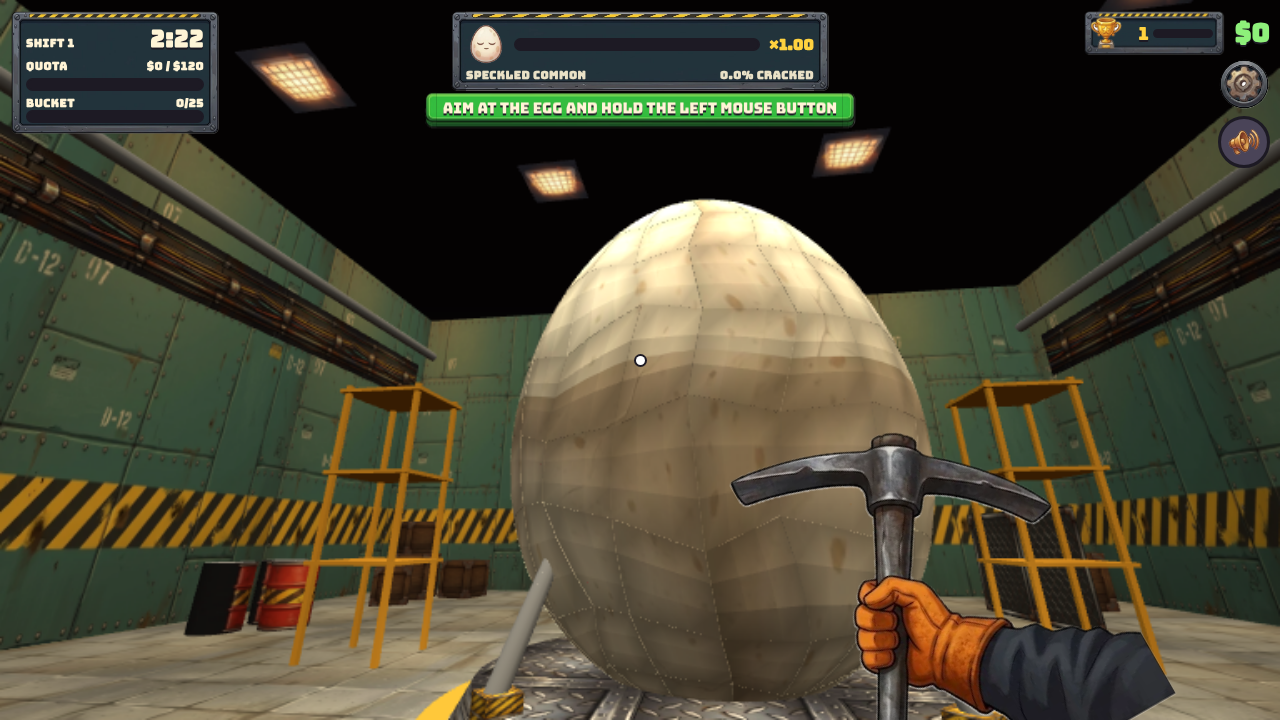
Press Play on this page to load Eggcavation in the official GameMonetize player, sized for 1280×720 and shown here at 16:9. AleksV02 developed the game. The listing for that official version is dated 6 November 2026.
The official Eggcavation game on eggcavation.com
This page exists so you can start Eggcavation from the domain that matches the game's name, through the official embed rather than an unofficial copy. After you press Play, the official player takes the place of the standby picture in the same 16:9 stage.
The frame is built for the official 1280×720 window and keeps that shape. On a phone held sideways, unused bars around the stage stay dark, and the picture is not cropped to fill leftover space. Share sits under the stage if you want to keep this address. Fullscreen is there if you want the stage to fill the display. On a short landscape phone screen, Fullscreen uses an immersive layout with a back control. Leaving that view does not unload the session or return you to the standby picture. Add to Home Screen appears only when installation is actually available.
A compact operator console under the stage repeats the first actions: move, strike, and sell shards to buy larger tools. The complete control list is in the section below, taken from the official listing, and also on the Eggcavation controls page. For the opening loop, see how to start the Eggcavation game.
After Play starts
Eggcavation is a 3D first-person clicker. According to the official GameMonetize listing, you stand in front of an enormous egg and break it open a plate at a time. You fill a bucket, sell the shards at a terminal, and spend that money on larger tools. The listing names a pickaxe, a sledgehammer, a jackhammer, a plasma drill, and a laser cutter, plus dynamite, drones, and other gear.
The same listing warns against striking the same point too hard, because the egg becomes angry. Payouts rise until the egg wakes and throws you across the room. The route described there runs through shell, membrane, and gold-veined ore toward a glowing core, which you then hatch. It lists 10 strange specimens, then still larger eggs, along with boss fights and random events such as gold rushes, power cuts, egg sneezes, and eggquakes. Hatchling pets, loot crates, trophies, daily missions, a 7-day gift, and a Lucky Wheel are also described. Progress is said to save automatically. The listing marks 9 languages and says the game runs on desktop, phone, and tablet.
Tools and upgrades in Eggcavation
The official GameMonetize listing for Eggcavation describes a short, repeating loop. You stand in front of a very large egg, in first person, and chip it open a plate at a time. The fragments go into a bucket. When that bucket is ready, you sell the shards at a terminal and turn them into cash. That cash is what you spend on bigger tools, and also on dynamite, drones, and other gear.
The listing names the bigger tools in this order: pickaxe, sledgehammer, jackhammer, plasma drill, and laser cutter. It presents them as successively larger tools funded by shard sales, not as five equal starting choices. The official text does not assign a specific tool to a specific layer, or list an unlock point for each one. What it does describe is the route through the egg: you dig through the shell, then the membrane, then gold-veined ore, toward a glowing core, which you then hatch.
That shard-to-cash rhythm is how progress is supposed to work. You chip, fill the bucket, sell, buy a bigger tool or one of the other listed items, and return to the egg. Heavier tools are the listing's way of framing later, tougher work; dynamite, drones, and gear sit beside the tool line as other purchases cash can cover. If a layer is slow, the official description still points back to selling shards and spending on those bigger tools, dynamite, drones, or gear.
The same listing also warns that hitting the same spot too hard makes the egg angry. That caution sits next to the upgrade path, because a larger tool can raise the payout and also push the egg toward waking. Shop and menu keys from the official instructions are how you buy the next tool once the terminal has paid you.
When the egg wakes up in Eggcavation
The official listing is clear about one risk in Eggcavation: if you hit the same spot too hard, the egg gets angry. It also says the payout climbs right up until the egg wakes up and throws you across the room. Those two lines belong together. The more you keep striking one point, the more the payout can rise, and the closer you get to the moment the egg wakes and throws you.
The listing does not describe a recovery move after you are thrown, or a special control that stops the egg from waking. The caution it gives is earlier in the loop: do not hit the same spot too hard. When you are chipping plates, filling the bucket, and selling shards, that warning is the only response the official text supports.
The same listing also names random events that can interrupt the work: gold rushes, power cuts, egg sneezes, and eggquakes. It lists them alongside boss fights, hatchling pets, loot crates, trophies, daily missions, a 7-day gift, and a Lucky Wheel. It does not explain what each event does, how long it lasts, or what you should press when one starts. This page therefore names those events as the official listing does, without adding a tactic the listing does not provide.
The larger route still stands after a throw or an event: dig through shell, membrane, and gold-veined ore to the glowing core, then hatch it. The listing then points to 10 strange specimens and, after that, endless bigger eggs. Progress is said to save automatically, so a throw is described as part of play, not as the end of a save. For the original wording of these events, use the official GameMonetize listing linked in the credits section.
Desktop keys and phone gestures
Once the official player is on screen, follow the prompts inside the game as well as this control list from the official listing.
On a desktop keyboard and mouse: WASD to move, mouse to look, hold left click to hit, Q or right-click for dynamite, E to lift, 1–7 for the shop and menus (1–8 buy inside the shop), and Esc to pause.
On a phone or tablet: move with the left side of the screen, drag the right side to look, and use the HIT, BOOM, and LIFT buttons.
Credits, listing, and what this domain is not
AleksV02 developed Eggcavation. For the original description and credits, use the official GameMonetize listing.
This website only embeds that official player. The playable files remain with the official player, and this domain does not claim the art, audio, or code.
If you want to leave a comment, do that on this page after you have started a session. Comments are for a note about playing Eggcavation. Questions about a save, a tool, or anything that happens inside the official player belong with the official listing and the developer.
For what this website is, see About. The privacy policy and terms apply to these pages. Contact explains where game questions should go.
If the official embed does not appear
Give the official player time to finish loading. A status message in the stage reads “Loading Eggcavation…”. If the session still has not started, a Retry control can appear in that same frame. Use it there. You can also try another browser or a more stable connection. Blocking scripts from the official GameMonetize player can leave the frame empty. If the player appears but the game itself fails, use the official GameMonetize listing.
Questions before you start a session
Where does the playable Eggcavation session actually run?
After you press Play, this page loads the official GameMonetize browser embed for Eggcavation. eggcavation.com does not host or redistribute the game files, and you do not collect a separate game package from this domain.
Which movement and strike controls does the official listing describe?
On a desktop, the official listing says to use WASD to move, the mouse to look, and hold left click to hit. On a phone or tablet, move with the left side of the screen, drag the right side to look, and use the HIT, BOOM, and LIFT buttons. Q or right-click is listed for dynamite, E to lift, 1–7 for the shop and menus, and Esc to pause. The full list, with a line on when to use each control, is on the Eggcavation controls page.
What can shard sales be spent on inside Eggcavation?
The official listing says you fill a bucket, sell shards at a terminal, and spend that money on larger tools. It names a pickaxe, a sledgehammer, a jackhammer, a plasma drill, and a laser cutter, plus dynamite, drones, and other gear.
Which Eggcavation tool should I buy first?
The official listing tells you to sell shards at the terminal and spend the cash on bigger tools. It names those tools in this order: pickaxe, sledgehammer, jackhammer, plasma drill, and laser cutter, plus dynamite, drones, and gear. That order is how the listing presents the tool line, from the first named tool to the last. It does not list prices or a required purchase sequence beyond calling them bigger tools, so the first step it supports is to sell shards and buy the next larger tool in that line when you can afford it, starting with the pickaxe. A longer walkthrough of those first steps is in how to start the Eggcavation game.
What should I do if I get stuck on a layer in Eggcavation?
The official listing describes the same loop at every stage: chip the egg plate by plate, fill your bucket, sell the shards at the terminal, and spend the cash on bigger tools, dynamite, drones, or gear. The route it names runs through the shell, the membrane, and gold-veined ore toward a glowing core. It also warns not to hit the same spot too hard, because the egg gets angry and may wake and throw you. The listing does not describe a separate trick for a layer that feels slow, so the supported response is to return to that shard-to-cash loop and the next bigger tool, rather than hammering one point.
When is Fullscreen useful on this page?
Use the Fullscreen button under the player when the 16:9 stage feels cramped, especially on a phone. An Exit fullscreen control remains on the player so you can leave that mode if the usual system control is hard to reach. On a short landscape phone screen, Fullscreen can use an immersive layout with a back control.
Why might a Retry control appear in the player frame?
The stage first shows a loading status. If the official player has not started after that wait, a Retry control can appear in the same frame. Use it there. You can also try another browser or a more stable connection. Blocking scripts from the official GameMonetize player can leave the frame empty.
Who can help if something breaks inside the game itself?
AleksV02 developed Eggcavation. This website only embeds the official GameMonetize version and cannot repair a fault inside the player or change a save. If the player appears but the game itself fails, use the official GameMonetize listing for anything that happens inside the player.